In today’s digital landscape, Microsoft Entra ID (formerly Azure AD) plays a pivotal role in managing access and security for numerous organisations. It acts as an orchestrator, in terms of access management, behind Microsoft 365, governing user access to a multitude of cloud applications, on-premises resources, and internal systems.
Entra ID, like any critical business system, is susceptible to misconfiguration, causing major disruption to users and access to data and systems. Implementing a robust backup solution for Entra ID is not just a best practice—it’s a necessity.

This blog delves into why backing up Entra ID is crucial, focusing on:
- Data protection
- Business continuity
- Compliance
- Cybersecurity
We will also explore how CloudCover Guardian for Azure, available within the CloudCover 365 Microsoft 365 Backup service, can provide a comprehensive solution.
Understanding Entra ID and Its Evolution
Microsoft Entra ID is often misunderstood, even among IT professionals. Many confuse it with Active Directory (AD) or Azure Active Directory (Azure AD). This confusion arises due to the introduction of the additional enhanced functionality Entra ID brings and how that integrates with the rest of your IT ecosystem.
Active Directory (AD):
- Initially, AD managed on-premises user access and authentication.
- It allowed servers, users, and resources to communicate within a local network.
Azure AD:
- With the shift to cloud computing, Azure AD extended AD functionalities to the cloud.
- Azure AD enables secure access to cloud-based applications and services, supporting hybrid environments where on-premises and cloud resources co-exist
Entra ID:
- Entra ID, formerly known as Azure AD, encompasses a broader range of tools and services under a single umbrella. It builds on the Identity and access management foundations of AAD, but amongst other things expands integrations and provides greater granular control. It also takes advantage of ML to access risk and is adaptive by nature.
- It provides comprehensive cloud identity management, supporting not just Microsoft services but also thousands of SaaS applications through pre-configured connectors.
Is Entra ID Backed up?
Not unless you have an independent backup in place.
Shared Responsibility Model
Microsoft’s shared responsibility model emphasises the distinct roles of Microsoft and its customers.
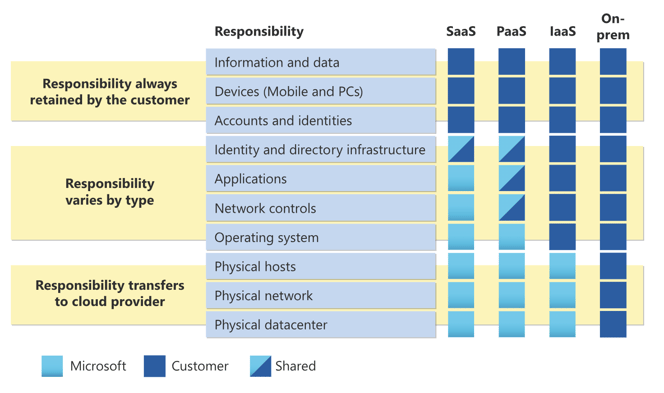
Microsoft – Division of responsibility
Microsoft’s Responsibilities:
- Maintain the backend infrastructure for Microsoft 365 services.
- Ensure service resilience and availability.
Customer’s Responsibilities:
- Manage and protect their data and identities.
- Implement backup solutions to ensure data availability and recovery.
This model highlights that while Microsoft ensures the platform’s operational integrity, customers must take proactive measures to safeguard their data, including identity configurations managed by Entra ID.
Why This Matters:
- Entra ID controls access to critical business applications and data.
- Misconfigurations can severely impact business operations.
Key Takeaways:
- Understanding Entra ID: Recognise it as a comprehensive cloud identity management tool, not just a rebranded Azure AD.
- Shared Responsibility: Acknowledge the need for robust backup solutions to protect your configurations and data.
What are the Benefits of Backing Up Entra ID?
Business Continuity
Quick Recovery from Incidents:
Minimising Downtime: With a full-fidelity backup of Entra ID, businesses can quickly restore their configurations and access controls, ensuring minimal disruption to operations. This is crucial for maintaining productivity and avoiding the repercussions of extended downtime.
Reduced Financial Losses:
- Cost Savings: By minimising downtime and ensuring a swift recovery, businesses can avoid significant financial losses. According to a study by IBM, the average cost of a data breach in 2021 was USD 4.24 million (BrightTALK)
- Improved Productivity: Quick recovery ensures that employees can resume their work with minimal interruption, maintaining overall productivity.
Security and Compliance
Meeting Regulatory Requirements:
- Compliance: Data protection regulations such as GDPR, ISO 27001, and NIST require organisations to have robust data protection and recovery mechanisms in place. Regular backups of Entra ID help ensure compliance with these regulations (Comma Soft)
- Audit Readiness: Having a backup in place means that businesses can quickly provide necessary documentation and evidence of compliance during audits.
Mitigating Security Risks:
- Preventing Data Breaches: Regular backups help quickly restore secure configurations, preventing unauthorised access and potential data breaches. This is particularly important for protecting sensitive information and maintaining customer trust.
- Tracking Changes: Advanced backup solutions like CloudCover Guardian for Azure track changes and alert administrators to unauthorised modifications, enhancing overall security.
Data Protection and Recovery
Restoring Entra ID Configurations:
- Full-Fidelity Backups: These backups capture every setting and configuration within Entra ID, ensuring that all aspects of identity management can be restored accurately. This includes user accounts, access privileges, security groups, and more.
- Quick Restoration: In the event of accidental deletions or malicious modifications, having a backup allows for quick restoration to a known good state, safeguarding the business from potential disruptions.
Conditional Access Policies
Maintaining Security Posture:
- Backup of Policies: Conditional access policies are critical for ensuring that only authorised users can access certain resources. Backing up these policies ensures that they remain effective even after a misconfiguration incident.
- Quick Recovery: With a recent backup, businesses can quickly restore these critical configurations, maintaining their security posture and protecting valuable business assets.
Migration and Upgrades
Facilitating Smooth Transitions:
- Ease of Migration: When deploying new services or making significant changes to Entra ID configurations, having backups provides a reference point. This ensures data and configurations can be migrated confidently and minimises the risk of disruptions.
- Upgrades: Before making major upgrades or changes to the Entra ID environment, creating backups allows businesses to roll back to a known good state if any issues arise during the process.
Countering Cyber Threats
Recovering from Ransomware and Malicious Activities:
- Cyber Resiliency: In the event of a security breach, ransomware attack, or other malicious activities, having a backup allows for quick recovery to a pre-attack state. This minimises downtime and mitigates the impact of such attacks, safeguarding the business from financial losses and reputational damage.
- Comprehensive Protection: Regular backups ensure that all critical Entra ID configurations are protected, providing a robust defence against various cyber threats.
Key Takeaways:
- Business Continuity: Ensuring quick recovery from incidents minimises downtime and financial losses.
- Security and Compliance: Backup blueprints help meet regulatory requirements and mitigate security risks.
- Data Protection: Full-fidelity backups ensure accurate restoration of Entra ID configurations.
- Conditional Access Protection: Maintaining security by backing up and quickly restoring access policies.
- Migration and Upgrades: Facilitating smooth transitions with reliable reference points.
- Cyber Resiliency: Enhancing recovery capabilities against cyber threats.
Technical Insights and Solutions
Looking at how to back up Entra ID? CloudCover Guardian for Azure can help.
Comprehensive Protection:
- All-Inclusive Backup: CloudCover Guardian for Azure provides comprehensive protection by backing up all Entra ID configurations and providing a blueprint, including user accounts, access privileges, security groups, and conditional access policies.
- Full-Fidelity Backups: The solution offers full-fidelity backups, capturing every setting and configuration detail. This ensures that businesses can restore their entire Entra ID environment accurately and quickly.
- Unique Features include Automated Backups: The solution performs automated backups daily, ensuring that the most recent configurations are always captured. This minimises the risk of major disruption and ensures quick recovery.
User-Friendly Interface:
- Ease of Use: The solution is designed with a user-friendly interface that simplifies the backup and recovery process. Administrators can easily manage backups, monitor changes, and initiate restores through a centralised console.
- Detailed Reports: CloudCover Guardian for Azure provides detailed reports, blueprints and dashboards, offering insights into backup status, changes made, and potential vulnerabilities.
Setup and Management
Simple Setup Process:
- Quick Configuration: Setting up CloudCover Guardian for Azure, as part of CloudCover 365, is straightforward and can be completed in a few clicks. Administrators need to provide their global admin credentials and configure a few settings to get started.
- Access Control: The platform allows access control for administrators to have monitoring access or elevated privileges to perform restores
- Automated Processes: The solution automates many processes, reducing the need for manual intervention. Daily backups and regular monitoring ensure continuous protection without extensive administrative effort.
Flexible Restoration Options:
- Granular Recovery: CloudCover Guardian for Azure allows for granular recovery, enabling administrators to restore individual configurations, user accounts, or entire environments. This flexibility ensures that businesses can address specific issues without disrupting the entire system.
- Comprehensive Rollback: In the event of a major incident, the solution provides a comprehensive rollback option, restoring all configurations to a previous state. This helps businesses recover quickly and resume normal operations.
Key Takeaways:
- Comprehensive Protection: CloudCover Guardian for Azure offers all-inclusive backup and advanced monitoring for Entra ID configurations.
- User-Friendly Interface: The solution simplifies backup and recovery processes through an intuitive interface and detailed reports.
- Simple Setup and Management: Easy setup, automated processes, and continuous monitoring ensure continuous protection with minimal administrative effort.
- Flexible Restoration: Granular and comprehensive restoration options enable quick recovery from incidents, minimising downtime and operational impact.
Customer Support and Success Stories
Customer Feedback
Ease of Use:
- Positive Experiences: Customers consistently highlight the user-friendly nature of CloudCover Guardian for Azure. The intuitive interface makes managing backups and restorations straightforward, even for those without extensive technical expertise.
- Quick Setup: Many customers appreciate the simplicity of the setup process, noting that they can get the solution up and running in just a few clicks. This ease of use is particularly beneficial for organisations that need to implement robust backup solutions quickly and efficiently.
Detailed Insights:
- Comprehensive Reports: Users find the detailed reports and dashboards provided by CloudCover Guardian for Azure extremely useful. These features offer clear insights into backup statuses, configuration changes, and potential vulnerabilities, enabling proactive management and swift response to issues.
- Change Tracking: The ability to track changes and unauthorised modifications has been praised for enhancing security and compliance efforts.

Microsoft Entra ID (formerly Azure AD) is a critical component in managing access and security for modern businesses. Implementing a robust backup solution for Entra ID is essential for ensuring data protection, business continuity, compliance, and cybersecurity.
CloudCover Guardian for Azure, part of the CloudCover 365 Microsoft 365 Backup service, offers comprehensive protection, user-friendly management, and detailed monitoring. By leveraging this solution, businesses can confidently protect their Entra ID configurations and quickly recover from any disruptions.
Ready to enhance your Entra ID backup strategy? Contact virtualDCS today for a personalised demo of CloudCover Guardian for Azure. Our experts are here to help you secure your configurations and ensure seamless business continuity.
Contact Us:
Phone: 03453 888 327
Email: enquiries@virtualDCS.co.uk
Discover how CloudCover Guardian for Azure can protect your critical configurations and keep your business running smoothly.