


Managed Backup Services Explained for Modern IT Teams
A practical guide to protecting, recovering and future-proofing your business data.
Your business data is one of your most valuable assets - and one of your most vulnerable. Whether it's a ransomware attack, accidental deletion, or a system failure at the worst possible moment, the question isn't if something will go wrong, but when.
Managed backup services give IT teams and business leaders the confidence that their data is protected, recoverable and compliant, without placing the entire burden on internal resources.
This guide covers everything you need to know about what managed backup services are, how Backup as a Service (BaaS) works, how it compares to managing backup software in-house, and what to look for when choosing a managed backup provider.
Use the links below to quickly navigate across this guide:
What Are Managed Backup Solutions?
Managed backup solutions are an outsourced approach to protecting your business data. Rather than your IT team configuring, monitoring and maintaining backup processes in-house, a specialist provider takes on that responsibility, handling everything from initial setup and automated scheduling through to recovery testing, compliance reporting and active monitoring.
The word managed is key in this definition. It is the difference between having a backup tool and having a backup service. With a managed solution, the ongoing responsibility for making sure your backups run correctly, completely and on schedule sits with your provider, not your team. If a backup job fails at 3 am on a Sunday, your provider should know about it and act on it.
What Does a Managed Backup Solution Actually Cover?
The scope of a managed backup solution varies by provider, but a comprehensive service could cover the following:
- Initial setup and configuration: Your provider designs and deploys a backup architecture suited to your specific environment, covering the right workloads, the right frequency, and the right retention periods from day one.
- Automated, scheduled backups: Backup jobs run automatically without any manual input from your team. Schedules are set based on your RPO requirements and adjusted as your environment changes.
- Continuous monitoring: Every backup job is monitored for successful completion. Failed or incomplete jobs are flagged immediately.
- Offsite and cloud storage: Your backup copies are stored in secure, separate locations, protecting them from site-level incidents such as fire, flood or hardware failure.
- Recovery testing: Backups are tested regularly to confirm that data can actually be restored. Untested backups are an unreliable safety net.
- Reporting and compliance documentation: Regular reports give you visibility over what is being backed up, how often, and where it is stored, supporting audit requirements and regulatory compliance.
- Recovery support: When you need to restore data, your provider supports the process, whether that is recovering a single deleted file or restoring an entire system following a major incident.
Who Uses Managed Backup Solutions?
Managed backup solutions are used across industries and business sizes, but they are particularly well-suited to organisations that share one or more of the following characteristics.
Businesses with lean IT teams
These organisations could find the managed model especially valuable. When your IT function is responsible for everything from end-user support to infrastructure, network security and compliance, backup monitoring can be easy to deprioritise. A managed service removes backup from the 'to-do list' entirely.
Organisations in regulated industries
These industries include financial services, healthcare, legal and public sectors. All of which would benefit from the audit trails, documented retention policies and compliance reporting that a managed backup provider would be able to provide.
This makes demonstrating that appropriate data protection measures are in place considerably more straightforward.
Growing businesses
Fast-growing organisations also find the scalability of managed backup solutions particularly attractive. As data volumes increase and infrastructure evolves, a managed provider scales with the business, without requiring additional internal resources or capital investment in new hardware.
What a Managed Backup Engagement Looks Like
For businesses considering a managed backup service for the first time, it is worth understanding what getting started typically involves.
The process usually begins with a scoping exercise, where your provider assesses your current environment, identifies the workloads that need protecting, and establishes your recovery requirements. This includes agreeing on your RTO and RPO targets for different systems, understanding any regulatory or compliance obligations, and reviewing your existing backup arrangements, if any are in place.
From there, your provider designs and deploys the solution, installing any required agents or connectors across your environment and configuring your backup schedules, retention policies and storage locations. For most organisations, this is completed with minimal disruption to day-to-day operations.
Once live, the service runs in the background. Your team retains visibility through a management portal, and your provider may handle the ongoing monitoring, maintenance and reporting.

Why Businesses Need Managed Backup
Data loss is no longer a risk reserved for large enterprises. Businesses of every size are targeted by ransomware, affected by accidental deletions, and exposed to hardware failures. The consequences of which can be critical.
For regulated industries, the stakes are even higher: GDPR obligations mean that failing to protect or recover personal data can result in significant fines, as well as long-lasting reputational damage.
Understanding why managed backup matters starts with understanding the threats businesses face every day.
Ransomware: The Threat That Targets Your Backups First
Ransomware has evolved significantly. Where early attacks focused on encrypting files and demanding payment to restore access, modern ransomware operations are far more sophisticated. Attackers now often conduct exploration inside a network before deploying their payload, specifically identifying and targeting backup systems before encrypting production data.
The logic is straightforward: if your backups are gone, you have no choice but to pay. A managed backup service with immutable storage removes that leverage entirely. Immutable backups cannot be altered, encrypted or deleted, even by an attacker with elevated access. Your backup copies remain untouched and available as a clean recovery point, regardless of what happens to your live environment.
The UK's National Cyber Security Centre (NCSC) publishes specific guidance on ransomware-resistant backups, recommending that organisations ensure backup data is resilient to destructive actions, including attempts to delete or overwrite it. Immutable, off-site storage sits at the heart of that recommendation. Read more about NCSC's guidance here.
Accidental Deletion and Human Error
Ransomware gets the headlines, but human error remains one of the most consistent causes of data loss in UK businesses. A file deleted by mistake, a folder overwritten during a migration, or an email archive wiped during a system change. These incidents happen quietly and without warning, and they are often not discovered until the data is urgently needed.
The challenge with accidental deletion is that many businesses assume their cloud platforms protect them. Microsoft 365, for example, moves deleted items to a recycle bin with a limited retention window. Once that window closes, the data is gone. Without a dedicated backup layer, there is no way to retrieve it.
Managed backup services typically maintain granular, point-in-time recovery options, meaning you can restore a specific file, folder, email or database record from a precise moment in the past. That level of precision is what makes recovery from human error genuinely straightforward rather than a painful, time-consuming process.
Downtime and the Cost of Not Recovering Quickly
Every hour your business cannot access its data is an hour of potentially lost productivity, missed revenue and frustrated customers. For businesses that depend on real-time access to critical systems, even a short recovery window can have a serious operational impact.
The speed at which you can recover from a data loss event depends entirely on how your backup solution has been designed and tested. A managed backup service is built around defined recovery objectives: how quickly systems need to be restored (your Recovery Time Objective, or RTO) and how much data can be lost in the process (your Recovery Point Objective, or RPO).
When these objectives are set, tested and actively managed by a specialist provider, recovery becomes a controlled process rather than a crisis. Your IT team knows exactly what to expect, your business stakeholders have realistic timelines, and the disruption is contained.
Compliance and Regulatory Obligations
For many UK businesses, data protection is not just a best practice. It is a legal requirement.
The UK GDPR places clear obligations on organisations to protect personal data from loss, corruption and unauthorised access. In the event of a breach, organisations must demonstrate that appropriate technical measures were in place. A managed backup solution, properly configured and documented, is one of the most tangible ways to evidence that standard of care.
Sector-specific regulations add further requirements. Financial services firms operating under FCA guidelines, healthcare organisations subject to NHS data standards, and legal practices handling sensitive client information all face distinct obligations around data retention periods, storage locations and recovery capabilities.
The Cyber Security and Resilience Bill, introduced to Parliament in November 2025 and currently progressing through the legislative process, is expected to extend mandatory cyber resilience requirements to a wider range of organisations, including managed service providers and data centres. Businesses that already have managed backup and documented recovery processes in place will be significantly better positioned as these requirements take effect.
The Case for Acting Before Something Goes Wrong
One of the most consistent patterns in data recovery situations is that businesses wish they had put a proper solution in place sooner. The impetus to act often comes after an incident, when the disruption and cost of recovery invested in managed backup feel entirely obvious in retrospect.
Managed backup services are considerably more accessible than they were even five years ago. Cloud delivery has removed the need for upfront hardware investment, and the managed model means you are not taking on additional headcount to run the service. For most businesses, the monthly cost of a managed backup service will often be a fraction of what a single unplanned recovery incident would cost without one.
Data backup and recovery sit at the centre of any serious business continuity plan. The question is not whether your business needs it, but whether your current approach is reliable enough to trust when it matters most.
What Is Backup as a Service (BaaS)?
Backup as a Service, commonly referred to as BaaS, is a cloud-delivered model for data backup where a specialist provider manages your entire backup infrastructure on your behalf. Instead of investing in hardware, software licences, and the internal expertise to run them, the provider's software handles your backups automatically, stores them in a secure offsite environment, and engineers monitor them around the clock.
It has become a standard part of managed IT services, and for good reason. As business data grows in volume, complexity, and value, the old approach of managing backups solely in-house often can't keep pace with evolving threats and recovery best practices. BaaS addresses that gap directly, delivering enterprise-grade data protection in a model that works for organisations of any size.
How BaaS Works
At its core, Backup as a Service works by installing an agent or connector within your environment, on your servers, virtual machines, or cloud workloads, that continuously captures changes to your data and replicates them to a secure, off-site location managed by your provider.
Rather than running nightly full backups that consume significant bandwidth and storage, modern BaaS solutions use incremental backup technology. This means only the data that has changed since the last backup is captured and sent, reducing the load on your network and your systems while keeping your backup copies current.
Your backups are stored in your provider's data centres, encrypted in transit and at rest. From there, your provider monitors the health of every backup job, alerts your team if something fails, and ensures that recovery is possible when you need it.
The management of the service sits with your provider, not your internal team. Your IT team often retains visibility through an online portal, where you can see what has been backed up, when, and confirm the status of your data at any time, but the day-to-day responsibility for making sure backups run correctly, completely, and on schedule belongs to your provider.
BaaS vs Traditional Backup
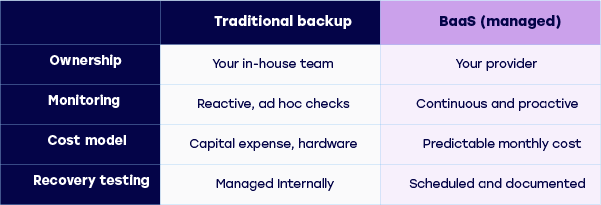
The difference between Backup as a Service and traditional backup comes down to who is responsible for what, and where your data lives.
With traditional backup, your organisation owns and manages the entire process. Your IT team installs and configures backup software, maintains the hardware it runs on, monitors job completion, and responds when something fails. Recovery testing, software updates, licence renewals, all of that sits with your team. For a small IT department already managing a full workload, backup often ends up reactive rather than proactive.
BaaS shifts that responsibility. The infrastructure, the monitoring, the expertise and the response all sit with your provider. Your internal team is no longer the last line of defence when a backup job silently fails at 2am, your provider is.
There is also a meaningful financial difference. Traditional backup carries capital expenditure, hardware purchases, refresh cycles, software licences, alongside the ongoing internal time cost of managing it. BaaS converts that into a monthly operational cost, with no hardware to maintain and no refresh bills.
For businesses weighing up the two models, the right question is not which is cheaper on paper; it is which gives you a higher level of confidence that your data is actually protected and recoverable. Some businesses also use both models, using a BaaS service to secure offsite copies of data while maintaining onsite backups as part of a 3-2-1-1-0 approach.
What Workloads Can BaaS Protect?
One of the strengths of a well-built Backup as a Service solution is the breadth of environments it can protect. Modern businesses rarely run a single, uniform infrastructure and your backup solution needs to keep pace with that reality.
A comprehensive BaaS solution should be able to cover, depending on your business needs and technology stack:
- Physical servers and workstations: On-premise servers and end-user devices running Windows, Linux or macOS.
- Virtual environments: VMware vSphere and Microsoft Hyper-V workloads, including support for agentless backup at the hypervisor level.
- Cloud workloads: Virtual machines and workloads running in Microsoft Azure and Amazon Web Services, giving you consistent protection across hybrid and multi-cloud environments.
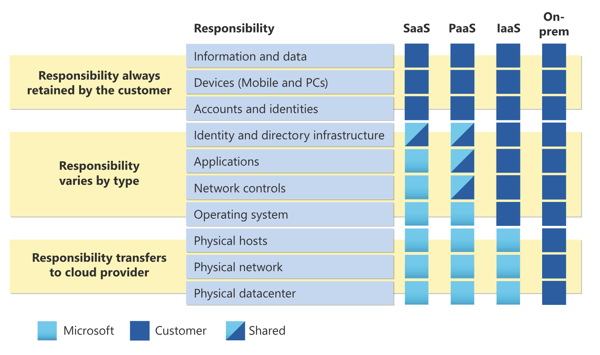
- Microsoft 365: Exchange Online, SharePoint, OneDrive and Teams data. Many businesses assume Microsoft 365 data is automatically protected, it is not. Microsoft operates a shared responsibility model, and protecting your 365 data against deletion, corruption and ransomware requires a dedicated backup layer.
The ability to protect all of these workloads through a single, managed service with unified monitoring, reporting and recovery is what makes BaaS genuinely valuable for IT teams managing complex environments.
The Security Case for BaaS
Data security is one of the most compelling reasons to move to a managed backup model, and it goes beyond simply storing copies of your data offsite.
Ransomware attacks increasingly target backup systems specifically. Cybercriminals know that if they can encrypt or delete your backups before you notice, your options become limited and you may be forced to pay the ransom or lose the data. A properly configured BaaS solution helps remove that leverage.
The critical feature here is immutable storage. Immutability means that once a backup copy has been written, it cannot be altered, encrypted or deleted, not by ransomware, not by an insider threat, and not even by an administrator. Your backup copies are locked, protected and always available as a clean recovery point.
Combined with end-to-end encryption, protecting your data both in transit between your environment and your provider's data centres, and at rest within those facilities, BaaS gives you a level of backup security that is genuinely difficult to replicate with on-premise solutions alone.
For UK businesses, data sovereignty is also a relevant consideration. Knowing that your backup data is stored exclusively in UK-based data centres, subject to UK law, accessible to your team, and not routed through overseas infrastructure, matters both for compliance and for peace of mind.
CloudCover Vault: BaaS from DCS
CloudCover Vault is DCS's Backup as a Service solution, built for businesses and delivered from secure UK data centres. It is powered by Veeam, the industry's leading backup and recovery platform, and delivered by DCS as an award-winning Platinum Veeam partner.
Vault protects a wide range of workloads from a single managed service, including physical servers, Windows, Linux and macOS, VMware and Hyper-V virtual environments, Azure and AWS cloud workloads, and Microsoft 365.
Every backup is stored as an immutable, encrypted copy, isolated from your production environment so that ransomware and other threats cannot reach it.
Setup and configuration are handled by DCS's engineer-led service desk team, people with deep Veeam expertise, most of whom have been with the business for years. Once live, you manage and monitor your backups through Vault's online portal, with the same visibility you would expect from a local backup solution, and the confidence that comes from knowing a specialist team is watching over it around the clock.
Flexible RTOs and RPOs mean that Vault can be configured to meet your specific recovery requirements, whether you need daily backups for general workloads or near-continuous protection for your most business-critical systems.
Cloud Backup and Disaster Recovery
Cloud backup and disaster recovery are two terms that are often used in the same conversation, and rightly so. They are closely connected disciplines, and a strong backup strategy is the foundation on which any credible recovery plan is built. Understanding what each one does and where one ends and the other begins helps businesses make better decisions about how to protect themselves.
What Is the Difference Between Backup and Disaster Recovery?
Backup is the process of creating regular, protected copies of your data. If something goes wrong, you restore from those copies. It answers the question: Do we have a clean version of our data that we can recover from?
Disaster recovery is broader in scope. It encompasses the full set of processes, tools and plans required to restore not just your data, but your systems, applications and operations, following a significant incident. It answers a different question: how quickly can our business get back to functioning normally, and what does that process look like?
In practice, backup feeds into disaster recovery. Without reliable, tested backups, no disaster recovery plan can function. But a recovery plan goes further than backup alone, covering things like system failover, communication procedures, roles and responsibilities during an incident, and defined timelines for restoration.
For this page, we are focused on the backup side of that relationship: how cloud backup works, how it is structured to support recovery, and what good backup practice looks like as part of a broader resilience strategy.
RTO and RPO: Setting Your Recovery Expectations
Two terms sit at the heart of any conversation about cloud backup and recovery planning: Recovery Time Objective (RTO) and Recovery Point Objective (RPO). Understanding both is essential for any IT manager or business leader making decisions about backup frequency, storage architecture and provider selection.
Recovery Time Objective (RTO) is the maximum amount of time your business can afford to be without access to its systems or data following an incident. It is essentially your downtime tolerance. An RTO of four hours means that from the moment an incident occurs, systems need to be restored and operational within four hours.
Recovery Point Objective (RPO) is the maximum amount of data your business can afford to lose, measured in time. An RPO of 24 hours means your backups run at least once a day, and in the event of an incident, you accept that up to 24 hours of data may not be recoverable. For most businesses, this is too much. An RPO of one hour, or even less, is more appropriate for business-critical systems.
A managed backup provider will work with you to establish realistic RTO and RPO targets for different systems and workloads, because not everything in your environment needs the same level of protection. Your customer database may have a very different RPO requirement than your internal file share.
How Cloud Backup Supports Recovery
Cloud backup strengthens your ability to recover from an incident in several important ways, beyond simply having a copy of your data stored somewhere offsite.
Offsite storage removes the single point of failure. If your primary site is affected by a fire, flood, power failure or physical break-in, an on-premise backup stored in the same building is lost alongside your live data. Cloud backup stores your copies in a separate, geographically distinct location, meaning a site-level incident does not take both your live environment and your backups offline at the same time.
Replication enables faster recovery. Standard backup creates point-in-time copies of your data at scheduled intervals. Replication goes further, continuously syncing data changes to a secondary location in near real-time. For workloads where your RPO needs to be measured in minutes rather than hours, replication is the appropriate approach. It means that in the event of an incident, the gap between your live data and your recovery point is as small as possible.
Immutability protects your recovery point. A backup copy is only useful if it remains intact and unaltered when you need it. Immutable cloud storage ensures that your backup data cannot be modified, encrypted or deleted between the point it is written and the point you need to restore from it. This is particularly important in ransomware scenarios, where attackers actively seek out and compromise backup copies before triggering their payload.
Tested recovery builds genuine confidence in your process, and storing backup copies is only the first step. The only way to know that your backups will work when you need them is to test recovery regularly. A managed backup provider may conduct scheduled recovery tests, document the results, and flag any issues before they become a problem during an actual incident. This is a step that can drop down the priority list when a busy team is managing backups in-house.
The 3-2-1-1-0 Backup Rule
The 3-2-1 backup rule has long been a foundational principle for structuring a resilient backup strategy, and its core logic remains sound. But as ransomware has grown more sophisticated in how it actively targets and destroys backup copies, the industry has evolved the model. The current standard widely adopted across the data protection industry is the 3-2-1-1-0 rule.
The principle breaks down as follows:
- 3 copies of your data in total
- 2 stored on different types of media or infrastructure
- 1 stored offsite, away from your primary location
- 1 copy that is either immutable or air-gapped
- 0 errors, verified through regular recovery testing

The first three elements are unchanged from the original rule. The fourth and fifth are where the model has evolved in direct response to the modern threat landscape.
The extra “1” addresses a specific and growing problem: ransomware attacks that target backup copies before triggering encryption across the rest of a network. If your backups can be reached and destroyed alongside your live data, you have limited your options to recover outside of paying the ransom.
An immutable backup copy cannot be altered, encrypted or deleted once written, even by an attacker with elevated access. An air-gapped copy goes further still, physically disconnecting a backup from any network entirely. Either approach removes the ability for an attack to reach and compromise your recovery point.
The “0” shifts what a backup means. Zero errors means that every backup is verified and confirmed restorable, not simply confirmed as completed. A backup job that finishes without errors but produces a corrupt or unrecoverable file is not a backup you can rely on when it matters. The 0 in 3-2-1-1-0 makes tested recoverability a formal part of the strategy, not an optional extra.
In a cloud backup context, this might mean your live data on-premise, a local backup copy on a separate on-site device, a third copy replicated to your provider’s cloud data centres, and a fourth copy stored in immutable object storage with regular automated verification.
A managed backup provider can help you implement and maintain a 3-2-1-1-0 architecture appropriate to your environment, including the ongoing verification testing that the final digit demands, without requiring your IT team to design and manage it from scratch.
What This Means for Your Resilience Strategy
Cloud backup is not a complete resilience strategy on its own. It is a critical component of one. When your backups are well-structured, regularly tested, stored offsite and protected with immutable storage, they give your business a solid foundation to recover from almost any data loss scenario.
What sits on top of that foundation, including how your systems are failed over, how your teams communicate during an incident, and how quickly your business can return to normal operations, falls within the scope of a broader disaster recovery plan.
Managed Backup vs Backup Software
Many businesses start out managing their own backups using backup software, tools installed on-premise or in the cloud that give your IT team direct control over the process. For small, simple environments, this can work. But as your data grows, your infrastructure becomes more complex, and teams look to follow best practices like 3-2-1-1-0, the limitations become clear.
One of the core differences is that backup software is a tool. Managed backup is a service.
With backup software, your team is responsible for configuring it correctly, monitoring it daily, testing recoveries regularly, updating it when new versions are released, and responding when something fails. That's a significant ongoing commitment, and in some IT teams, backup monitoring can slip to the bottom of the priority list until something goes wrong.
Managed backup services take the lion's share of that responsibility off your team. Monitoring, testing, alerting and recovery support are handled by specialists, people who do this every day, across multiple industries and environments.
The cost comparison is also worth looking at carefully. Software licences, the internal time spent managing them, the hardware to run them on, and the cost of downtime when a recovery fails - these can add up to more than a managed service costs. The managed model also converts what would be a capital expense into an operational one.
Keeping backup management in-house can be the right choice for many environments and teams, particularly where it supports a robust 3-2-1-1-0 approach. But for businesses where data protection is business-critical, adding a managed approach to the process can help deliver consistently reliable outcomes.
Key Features of a Managed Backup Solution
Not all managed backup solutions are equal. When evaluating providers, these are the features that matter most:
- Automated backups. Backups should run automatically, on a defined schedule, without requiring manual intervention from your team. This removes the risk of human error and ensures consistency.
- Immutable storage. Immutable backup storage means your backup copies cannot be altered, encrypted or deleted, not even by someone with administrator access. This is your most important defence against ransomware attacks that specifically target backup systems.
- Ransomware protection. Beyond immutability, look for solutions that include anomaly detection, flagging unusual backup behaviour that might indicate an attack is underway, before it can reach your backup copies.
- Backup monitoring. Your provider should be monitoring your backups continuously, not waiting for you to report a failure. Proactive alerts and regular reporting give you visibility without creating extra work.
- Recovery testing. A backup that has never been tested is a backup you cannot rely on. Regular, documented recovery tests are non-negotiable in any serious managed backup service.
- Compliance support. Your managed backup solution should be able to demonstrate where your data is stored, how long it is retained, and who has access to it. UK data sovereignty, storing data in UK-based data centres, is an important consideration for many organisations.
How to Choose a Managed Backup Provider
Choosing a managed backup provider is a decision that directly affects your ability to recover from a serious incident. It deserves more scrutiny than a straightforward price comparison.
Here are the questions worth asking before you commit:
- What does the SLA guarantee? Service level agreements vary enormously. Look beyond uptime figures and ask specifically about recovery time commitments. How quickly will they help you recover data if something goes wrong?
- How is backup monitoring handled? Is someone actively watching your backups around the clock, or is monitoring automated with alerts sent to an inbox that may not be actioned immediately? There's a meaningful difference between a provider that responds to failures and one that simply reports them.
- Is disaster recovery integrated? Your backup provider and your DR plan should work in alignment. If they are entirely separate, gaps can appear, particularly around RTO and RPO commitments.
- Is recovery testing included and documented? Ask how often testing happens and what the results look like. Providers who cannot show documented evidence of regular recovery testing represent a risk.
- Where is your data stored? For UK businesses with compliance obligations, data sovereignty matters. Your backups should be stored in UK-based data centres, with clear documentation of who can access them and under what circumstances.
- What does support actually look like? When something goes wrong, you need to speak to someone who knows your environment. Ask directly: Is support handled in-house or outsourced? Is there a dedicated team or a general helpdesk?
At DCS, we've been specialising in data backup and recovery for 15 years. Our UK-based support team, real people, no bots, no outsourced helpdesks, is on hand when you need us most. Several of our team members have been with us for over a decade, bringing deep expertise to every customer environment we look after.
We hold ISO 27001, ISO 9001 and Cyber Essentials accreditations, and we've won the Veeam Innovation Award two years running, because we believe that protecting business-critical data requires more than just good technology. It requires a team that genuinely cares about getting it right.
If you're ready to explore what managed backup services could look like for your business, contact our team.
Managed Backup FAQ
We've put together some frequently asked questions for managed backup.
Backup is the process of copying and storing your data at regular intervals so it can be restored if lost or corrupted. Disaster recovery is a broader strategy for restoring entire systems, applications and operations following a major incident.
Backup is a component of disaster recovery, but a DR plan goes further, defining how quickly you need to restore normal operations (RTO) and how much data your business can afford to lose (RPO).
It depends on how much data your business can afford to lose. For most businesses, daily backups are a minimum. For business-critical systems, hourly or near-continuous replication is more appropriate. Your RPO defines this threshold: if your RPO is four hours, your backups need to run at least every four hours to stay within it.
Immutable backup storage means your backup data cannot be altered, encrypted or deleted once it has been written, even by someone with administrative access. It's one of the most effective defences against ransomware attacks that specifically target backup copies. Any serious managed backup solution should include immutable storage as standard.
Backup as a Service (BaaS) is a cloud-delivered backup model where a specialist provider manages your entire backup infrastructure on your behalf. Your data is backed up automatically to secure, offsite locations, with monitoring, testing and recovery support included. It removes the need for on-premise backup hardware and the internal resources to manage it.
Yes. Microsoft operates a shared responsibility model. Microsoft keeps the platform running, but protecting your data within it is your responsibility. Emails, Teams messages, SharePoint files and OneDrive content are not automatically backed up in a way that guarantees full recovery. A dedicated backup solution for Microsoft 365 ensures that data is protected and recoverable if something goes wrong.
Absolutely. Smaller businesses often benefit most from the managed model, because they typically have fewer internal IT resources to dedicate to backup management. Managed backup services are scalable, you pay for what you need, and the monitoring and expert support that comes with them can be the difference between recovering quickly and not recovering at all.

Talk to the DCS team
Engage with our data protection team to see how DCS helps minimise downtime, protect revenue streams, and maintain customer trust through robust backup and disaster recovery.